Getting Started
Installing FlowRunner
Currently FlowRunner is available through PyPI
pip install flowrunner
To install the latest development version
pip install git+https://github.com/prithvijitguha/flowrunner@main
Quickstart
Create your first Flow
Create a file called example.py containing the below code. Make sure to cd to same the directory that
contains example.py
# -*- coding: utf-8 -*-
from flowrunner import BaseFlow, end, start, step


class ExampleFlow(BaseFlow):
    @start
    @step(next=["method2", "method3"])
    def method1(self):
        """Example of a method with a docstring which
        will become description"""
        self.a = 1

    @step(next=["method4"])
    def method2(self):
        self.a += 1

    @step(next=["method4"])
    def method3(self):
        self.a += 2

    @end
    @step
    def method4(self):
        self.a += 3
        print(self.a)


class ExampleFlow2(BaseFlow):
    @start
    @step(next=["method2", "method3"])
    def method1(self):
        self.a = 1

    @step(next=["method4"])
    def method2(self):
        self.a += 1

    @step(next=["method4"])
    def method3(self):
        self.a += 2

    @end
    @step
    def method4(self):
        self.a += 3
        print(self.a)
Working with your Flow
Flows can be run in two ways:
cli: The command line interface way
python -m flowrunner [COMMAND] [PATH_TO_FLOW_FILE.py]Flow methods: The inbuilt class methods
ExampleFlow().insert_method_name()
validate your Flow
We run validate to validate our Flow
python -m flowrunner validate example.py
# we create an instance of the class and run its corresponding method
ExampleFlow().validate()
The output runs validation checks on your Flow with ✅ for passed and ❌ for failed
2023-03-08 22:36:58 LAPTOP flowrunner.system.logger[9008] INFO Found flow ExampleFlow
2023-03-08 22:36:58 LAPTOP flowrunner.system.logger[9008] DEBUG Validating flow for ExampleFlow
✅ Validated number of start nodes
✅ Validated start nodes 'next' values
✅ Validate number of middle_nodes
✅ Validated middle_nodes 'next' values
✅ Validated end nodes
✅ Validated start nodes 'next' values
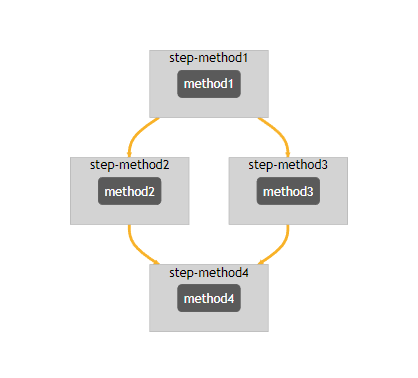
display your Flow
We can use display command to visualize your Flow DAG in a notebook or the CLI to save it to the current folder
python -m flowrunner display example.py
# we create an instance of the class and run its corresponding method
ExampleFlow().display()
show your Flow
We can use show command to display the order of iteration of our flow with description of each
step based on the docstring of the function
Output will look like this. “?” is used in absence of a docstring for the method. However if you add a docstring that will show up too!
python -m flowrunner show example.py
# we create an instance of the class and run its corresponding method
ExampleFlow().show()
2023-03-08 22:35:24 LAPTOP flowrunner.system.logger[12692] INFO Found flow ExampleFlow
2023-03-08 22:35:24 LAPTOP flowrunner.system.logger[12692] DEBUG Validating flow for ExampleFlow
✅ Validated number of start nodes
✅ Validated start nodes 'next' values
✅ Validate number of middle_nodes
✅ Validated middle_nodes 'next' values
✅ Validated end nodes
✅ Validated start nodes 'next' values
2023-03-08 22:35:24 LAPTOP  flowrunner.system.logger[12692] DEBUG Show flow for ExampleFlow
method1

?
   Next=method2, method3


method2

?
   Next=method4


method3

?
   Next=method4


method4

?
   Next=
run your Flow
We can use run command to actually run the flow
python -m flowrunner run example.py
# we create an instance of the class and run its corresponding method
ExampleFlow().run()
2023-03-08 22:29:48 LAPTOP flowrunner.system.logger[13528] INFO Found flow ExampleFlow
2023-03-08 22:29:48 LAPTOP flowrunner.system.logger[13528] DEBUG Validating flow for ExampleFlow
2023-03-08 22:29:48 LAPTOP flowrunner.system.logger[13528] WARNING Validation will raise InvalidFlowException if invalid Flow found
✅ Validated number of start nodes
✅ Validated start nodes 'next' values
✅ Validate number of middle_nodes
✅ Validated middle_nodes 'next' values
✅ Validated end nodes
✅ Validated start nodes 'next' values
2023-03-08 22:29:48 LAPTOP flowrunner.system.logger[13528] DEBUG Running flow for ExampleFlow
7